

Expanding your company is an exciting time, but to know if it is the right time for growth, you need to be clear about whether your business is ready to support the growth. The best way to determine the financial health of your business is through the financial statements, which can be generated either monthly, quarterly, or annually. Generating these statements monthly can help you identify issues and areas of growth quickly, so your leadership can pivot in order to increase profitability over the long term. One of the most critical of these statements is the profit and loss statement. Let’s dive into what the P&L includes and check out our profit and loss statement template.
Importance of Profit and Loss Statements
A profit and loss statement shows your company’s revenues and expenses over a specific period. They can be used to compare year-over-year numbers (horizontal analysis) and industry benchmarking. You can also utilize them for trend analysis, rates of return, and return on assets. There are also the benefits of being able to gain insight into your net earnings and control indirect expenses while developing realistic sales targets. To come up with an accurate P&L statement, you need to understand the components involved and how they work together to give you a snapshot of your financial health.
Components of a Profit and Loss Statement Template
The components of a profit and loss statement are focused on understanding where your money is coming from and where it is going, allowing you to determine the profitability of the company, not just for one period of time but also as part of an ongoing analysis.
Expenses
The expenses included in your P&L statement come from several sources, your COGS (which are direct costs associated with revenue generation), operating expenses, non-operating expenses, and administration, such as tax and interest expenses.
Revenue
The revenue or gross income comes from all sources, either by generating income from sales or income from interest and subscriptions.
Net Profit
Net profit is the bottom line, and is the money left after all expenses and taxes are paid.

Different Types of Profit and Loss Statement Templates
There are two main options of accounting for P&L statements, which can assist you in the analysis of your company’s financial health. Choosing the right method depends on what your business is and what works best for your needs.
Cash Basis
Under the cash basis method, revenues and expenses are recorded when cash is received or paid out, respectively. This method is simpler and easier to implement but may not provide an accurate picture of a company’s financial performance as it does not account for transactions that have not yet been paid or received. However, for small businesses, this might be the right approach initially.
Accrual Approach
Under the accrual approach, revenues and expenses are recorded when they are earned or incurred, regardless of whether cash has been received or paid out. This option provides a more accurate picture of a company’s financial performance as it accounts for all transactions that have occurred during a specific period, even if they have not been paid or received yet. This is the method that is generally preferred by investors and financing institutions.
Profit and Loss Statement Samples
There are a variety of profit and loss statement samples that can be utilized to fit the needs of your business and highlight the expenses and revenue streams that are part of your business model. Below are a few examples of these samples, but your accounting software can be used to create a P&L statement that reflects your business model and its industry.

Profit and Loss Statement Templates
Profit and loss statement templates can be used to get to the heart of the financial health of your company by focusing on the unique aspects of your business model. Below are a few types of templates for various small businesses.
Small Business Profit and Loss Template
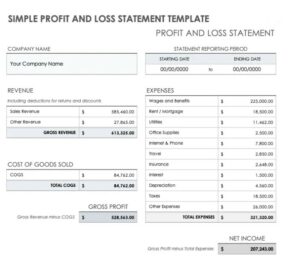
Below is a P&L statement tailored to fit the needs of a typical small business model.
Self-Employed Profit and Loss Statement Template
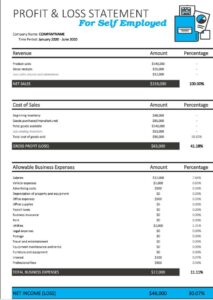
Self-employed individuals have their own unique business models, which means their P&L statements have to reflect the income and expenses unique to their professional career.
Restaurant Profit and Loss Statement Template
A restaurant P&L template usually includes 5 main sections:
- Sales breakdown
- Costs breakdown: COGS
- Labor costs
- Operating costs
- Net profit or loss
A P&L statement also enables you to calculate food cost percentage, gross profit, and net profit or loss. These metrics can be calculated from your sales, COGS, and costs, allowing you to fully understand the financial health of your restaurant.
Monthly, Quarterly, Annual & Weekly Profit and Loss Statement Template
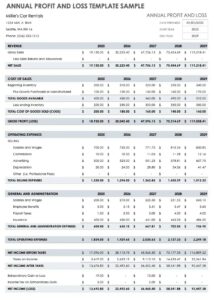
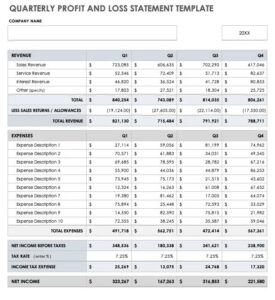
Below are examples of P&L statements that can be set up to reflect the weekly, monthly, quarterly, and annual timeframes. Your accounting software can be customized to create these reports by working with your bookkeeper.
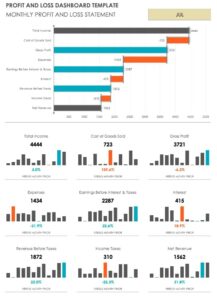
Retail, Construction, Home Business & Rental Property Profit and Loss Statement Template
With retail, construction, home business, and rental properties, the P&L can be adapted to fit their needs. For instance, a real estate profit and loss statement incorporate operating expenses related to property taxes, maintenance, property management fees, and more.
To adapt your P&L statement, work with your bookkeeper to customize your financial statements to reflect your business model.
Frequently Asked Questions
Are profit and loss statements the same for any kind of business?
While the elements of a profit and loss statement are the same, how your expenses and income are defined will be different based on your business model. To customize your P&L statement, work with your accounting software so you can reflect your business model.
What’s the difference between an income statement and profit and loss statement?
An income statement is a more in-depth version of a profit and loss statement, but they are frequently used interchangeably within the financial statements.
How can I use my profit and loss statement to make business decisions?
The P&L statement is one of the key financial documents for your business model. It can help you to make business decisions in the following ways:
- Compare P&L to budgets to calculate variance
- Review your current P&L against past performance
- Analyze gross profit margin
- Monitor operating expenses
- Evaluate the use of resources
- Assess high revenues and low margins
This is a regular opportunity to review the company’s high-level financial performance for the previous period and indicates the ability of your business to generate more profit through cost reductions and revenue increases.
What Is AccountsBalance?

AccountsBalance is a monthly bookkeeping service specialized for agencies & SAAS companies.
We take monthly bookkeeping off your plate and deliver you your financial statements by the 15th or 20th of each month.
You’ll have your Profit and Loss Statement, Balance Sheet, and Cash Flow Statement ready for analysis each month so you and your business partners can make better business decisions.
Interested in learning more? Schedule a call with our CEO, Nathan Hirsch.
And here’s some free resources:
In Summary
P&L statements are critical for analyzing your business and understanding how the revenue is being spent and what products and services are your most profitable. Creating profit and loss statements can be done with your accounting firm or bookkeeper, thus tailoring them to reflect the unique aspects of your business model, whether you are in real estate, hospitality, self-employed, or working in construction. Remember, the goal is to use your financial statements to achieve a clear-eyed picture of the financial health of your business today!